# Example preflight specs

This section includes common examples of preflight check specifications. For more examples, see the [Troubleshoot example repository](https://github.com/replicatedhq/troubleshoot/tree/main/examples/preflight) in GitHub.

## Check HTTP or HTTPS requests from the cluster

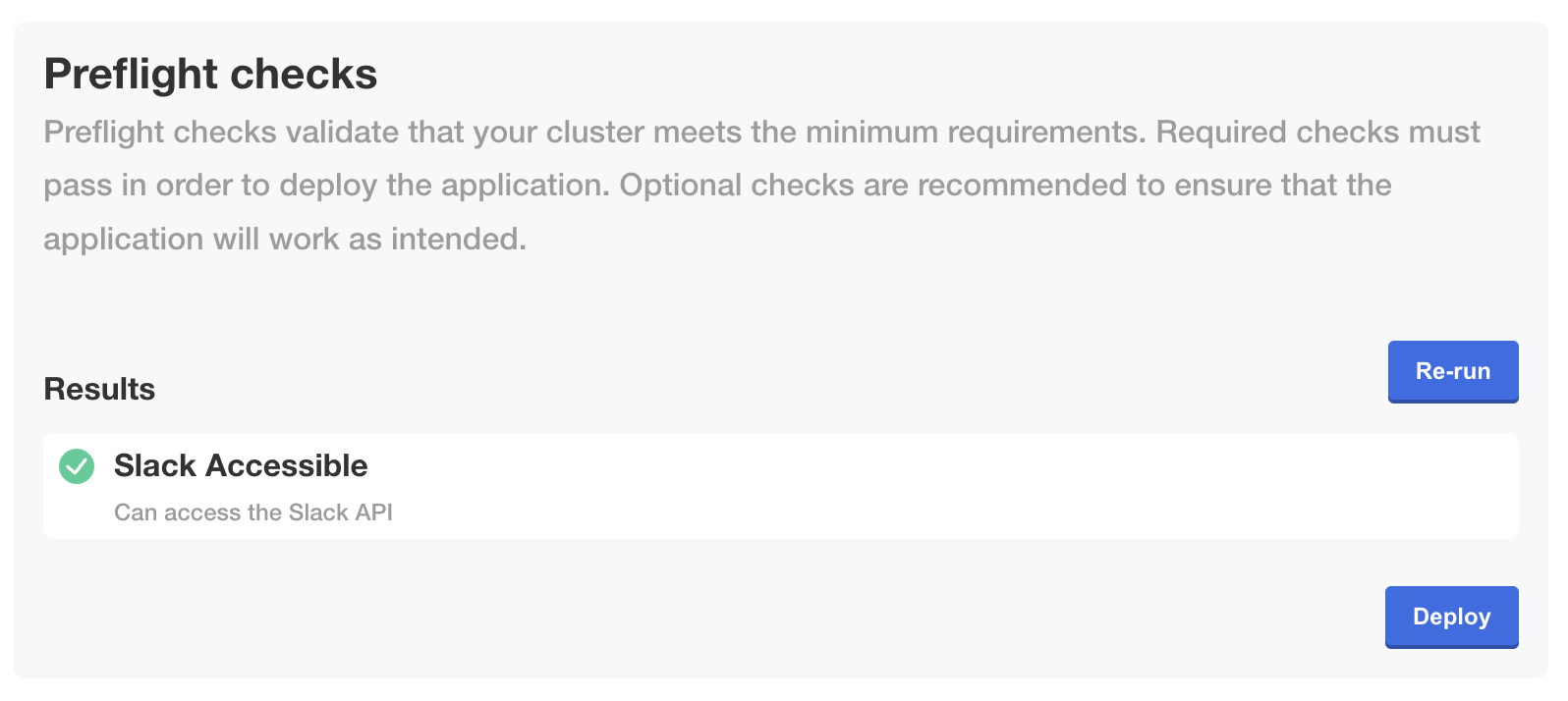
The examples below use the `http` collector and the `textAnalyze` analyzer to check that an HTTP request to the Slack API at `https://api.slack.com/methods/api.test` made from the cluster returns a successful response of `"status": 200,`.

For more information, see [HTTP](https://troubleshoot.sh/docs/collect/http/) and [Regular Expression](https://troubleshoot.sh/docs/analyze/regex/) in the Troubleshoot documentation.

<Tabs>
  <TabItem value="secret" label="Kubernetes Secret" default>
    ```yaml
    apiVersion: v1
    kind: Secret
    metadata:
      name: example
      labels:
        troubleshoot.sh/kind: support-bundle
    stringData: 
      support-bundle-spec: |-
        apiVersion: troubleshoot.sh/v1beta2
        kind: SupportBundle
        metadata:
          name: example
        spec:
          collectors:
            - http:
                collectorName: slack
                get:
                  url: https://api.slack.com/methods/api.test
          analyzers:      
            - textAnalyze:
                checkName: Slack Accessible
                fileName: slack.json
                regex: '"status": 200,'
                outcomes:
                  - pass:
                      when: "true"
                      message: "Can access the Slack API"
                  - fail:
                      when: "false"
                      message: "Cannot access the Slack API. Check that the server can reach the internet and check [status.slack.com](https://status.slack.com)."
    ```
  </TabItem>
  <TabItem value="custom-resource" label="Preflight Custom Resource">
    ```yaml
    apiVersion: troubleshoot.sh/v1beta2
    kind: SupportBundle
    metadata:
      name: example
    spec:
      collectors:
        - http:
            collectorName: slack
            get:
              url: https://api.slack.com/methods/api.test
      analyzers:      
        - textAnalyze:
            checkName: Slack Accessible
            fileName: slack.json
            regex: '"status": 200,'
            outcomes:
                - pass:
                    when: "true"
                    message: "Can access the Slack API"
                - fail:
                    when: "false"
                    message: "Cannot access the Slack API. Check that the server can reach the internet and check [status.slack.com](https://status.slack.com)."
    ```
    <p>The following shows how the <code>pass</code> outcome for this preflight check is displayed in the Admin Console during KOTS installation or upgrade:</p>
    <img alt="Preflight checks in Admin Console showing pass message" src="/images/preflight-http-pass.png"/>
    <a href="/images/preflight-http-pass.png">View a larger version of this image</a>
  </TabItem>
</Tabs>

## Check Kubernetes version

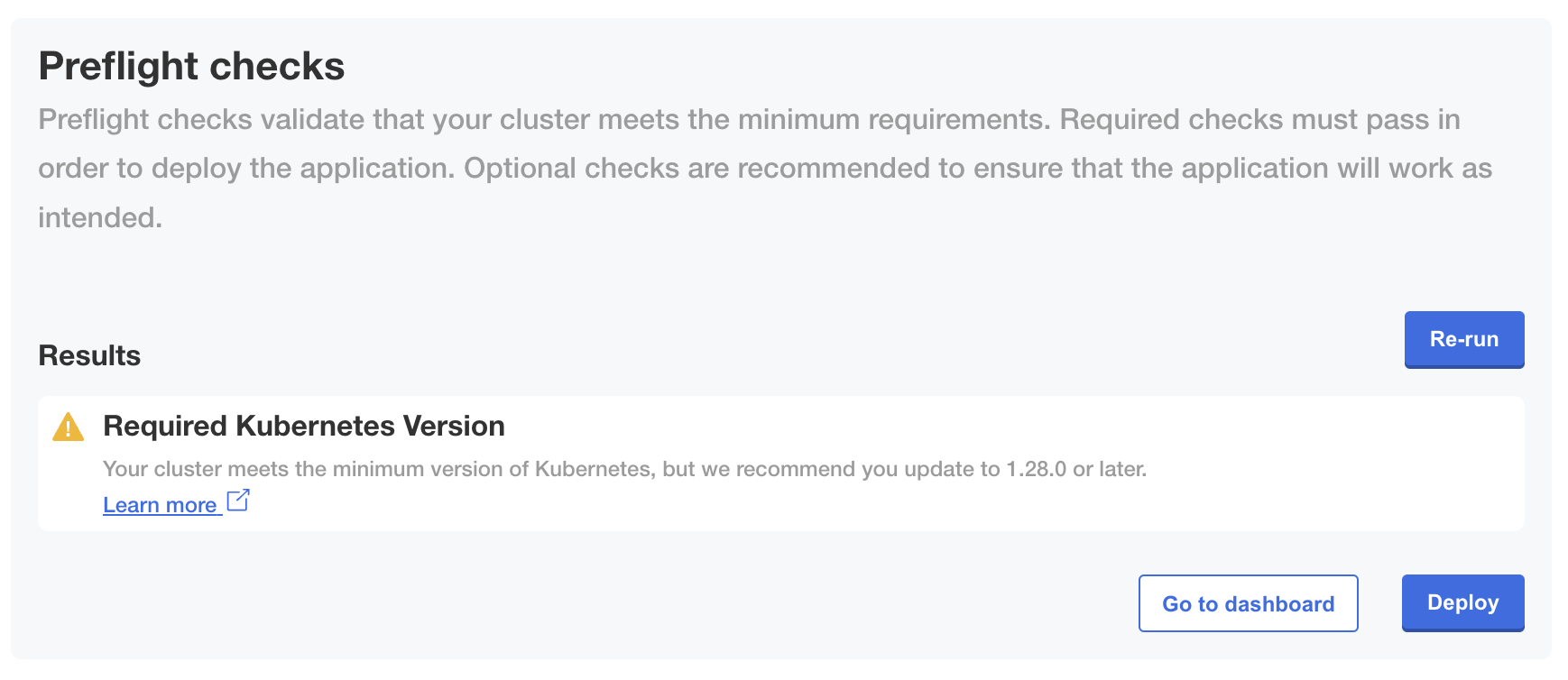
The examples below use the `clusterVersion` analyzer to check the version of Kubernetes running in the cluster. The `clusterVersion` analyzer uses data from the default `clusterInfo` collector. The `clusterInfo` collector is automatically included.

For more information, see [Cluster Version](https://troubleshoot.sh/docs/analyze/cluster-version/) and [Cluster Info](https://troubleshoot.sh/docs/collect/cluster-info/) in the Troubleshoot documentation.

<Tabs>
  <TabItem value="secret" label="Kubernetes Secret" default>
    ```yaml
    apiVersion: v1
    kind: Secret
    metadata:
      name: example
      labels:
        troubleshoot.sh/kind: support-bundle
    stringData: 
      support-bundle-spec: |-
        apiVersion: troubleshoot.sh/v1beta2
        kind: SupportBundle
        metadata:
          name: example
        spec:
          collectors: []
          analyzers:      
            - clusterVersion:
                outcomes:
                  - fail:
                      message: This application relies on kubernetes features only present in 1.16.0
                      and later.
                      uri: https://kubernetes.io
                      when: < 1.16.0
                  - warn:
                      message: Your cluster is running a version of kubernetes that is out of support.
                      uri: https://kubernetes.io
                      when: < 1.24.0
                  - pass:
                      message: Your cluster meets the recommended and quired versions of Kubernetes.
    ```
  </TabItem>
  <TabItem value="custom-resource" label="Preflight Custom Resource">
    ```yaml
    apiVersion: troubleshoot.sh/v1beta2
    kind: SupportBundle
    metadata:
      name: example
    spec:
      collectors: []
      analyzers:      
        - clusterVersion:
            outcomes:
              - fail:
                  message: This application relies on kubernetes features only present in 1.16.0
                    and later.
                  uri: https://kubernetes.io
                  when: < 1.16.0
              - warn:
                  message: Your cluster is running a version of kubernetes that is out of support.
                  uri: https://kubernetes.io
                  when: < 1.24.0
              - pass:
                  message: Your cluster meets the recommended and quired versions of Kubernetes.
    ```
    <p>The following shows how the <code>warn</code> outcome for this preflight check is displayed in the Admin Console during KOTS installation or upgrade:</p>
    <img alt="Preflight checks in Admin Console showing warning message" src="/images/preflight-k8s-version-warn.png"/>
    <a href="/images/preflight-k8s-version-warn.png">View a larger version of this image</a>
  </TabItem>
</Tabs>

## Check Kubernetes distribution

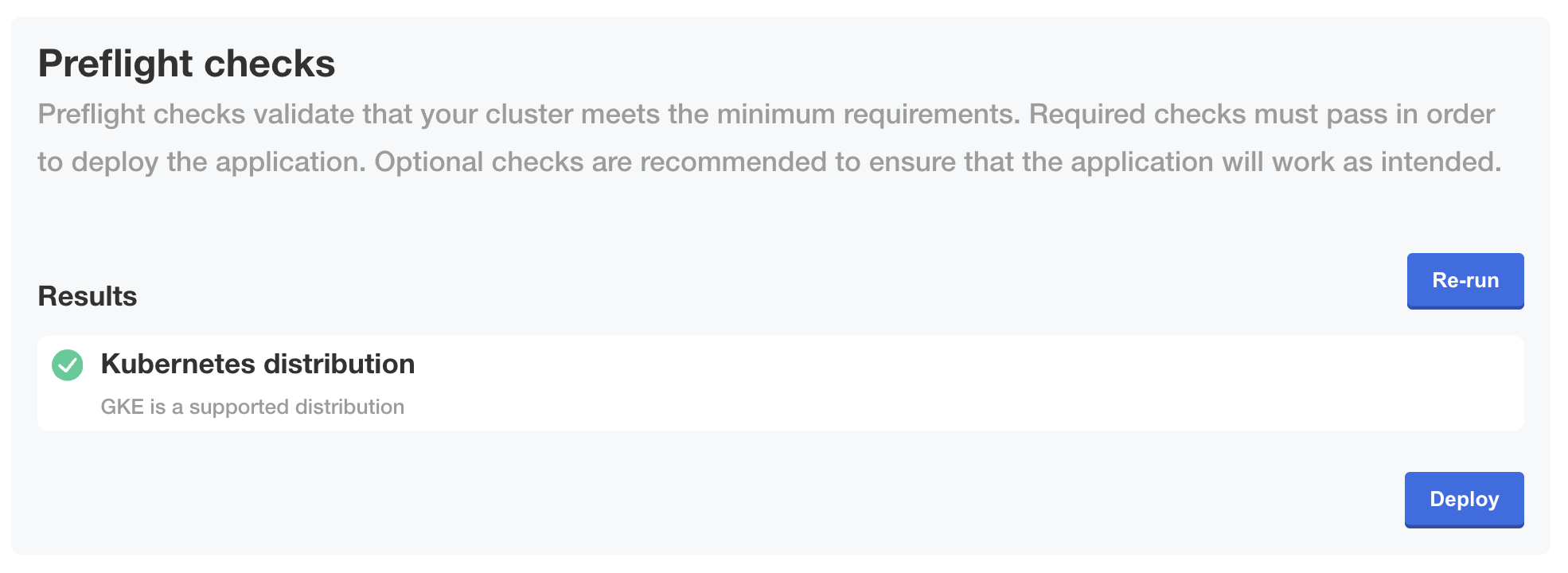
The examples below use the `distribution` analyzer to check the Kubernetes distribution of the cluster. The `distribution` analyzer uses data from the default `clusterInfo` collector. The `clusterInfo` collector is automatically included.

For more information, see [Cluster Info](https://troubleshoot.sh/docs/collect/cluster-info/) and [Distribution](https://troubleshoot.sh/docs/analyze/distribution/) in the Troubleshoot documentation.

<Tabs>
  <TabItem value="secret" label="Kubernetes Secret" default>
    ```yaml
    apiVersion: v1
    kind: Secret
    metadata:
      labels:
        troubleshoot.sh/kind: preflight
      name: "{{ .Release.Name }}-preflight-config"
    stringData:
      preflight.yaml: |
        apiVersion: troubleshoot.sh/v1beta2
        kind: Preflight
        metadata:
          name: preflight-sample
        spec:
          analyzers:              
            - distribution:
                checkName: Kubernetes distribution
                outcomes:
                  - fail:
                      when: "== docker-desktop"
                      message: The application does not support Docker Desktop Clusters
                  - fail:
                      when: "== microk8s"
                      message: The application does not support Microk8s Clusters
                  - fail:
                      when: "== minikube"
                      message: The application does not support Minikube Clusters
                  - pass:
                      when: "== eks"
                      message: EKS is a supported distribution
                  - pass:
                      when: "== gke"
                      message: GKE is a supported distribution
                  - pass:
                      when: "== aks"
                      message: AKS is a supported distribution
                  - pass:
                      when: "== kurl"
                      message: KURL is a supported distribution
                  - pass:
                      when: "== digitalocean"
                      message: DigitalOcean is a supported distribution
                  - warn:
                      message: Unable to determine the distribution of Kubernetes
    ```
  </TabItem>
  <TabItem value="custom-resource" label="Preflight Custom Resource">
    ```yaml
    apiVersion: troubleshoot.sh/v1beta2
    kind: Preflight
    metadata:
      name: my-app
    spec:
      analyzers:              
        - distribution:
            checkName: Kubernetes distribution
            outcomes:
              - fail:
                  when: "== docker-desktop"
                  message: The application does not support Docker Desktop Clusters
              - fail:
                  when: "== microk8s"
                  message: The application does not support Microk8s Clusters
              - fail:
                  when: "== minikube"
                  message: The application does not support Minikube Clusters
              - pass:
                  when: "== eks"
                  message: EKS is a supported distribution
              - pass:
                  when: "== gke"
                  message: GKE is a supported distribution
              - pass:
                  when: "== aks"
                  message: AKS is a supported distribution
              - pass:
                  when: "== kurl"
                  message: KURL is a supported distribution
              - pass:
                  when: "== digitalocean"
                  message: DigitalOcean is a supported distribution
              - warn:
                  message: Unable to determine the distribution of Kubernetes
    ```
    <p>The following shows how the <code>pass</code> outcome for this preflight check is displayed in the Admin Console during KOTS installation or upgrade:</p>
    <img alt="Preflight checks in Admin Console showing pass message" src="/images/preflight-k8s-distro.png"/>
    <a href="/images/preflight-k8s-distro.png">View a larger version of this image</a>
  </TabItem>
</Tabs>

## Check MySQL version using template functions

The examples below use the `mysql` collector and the `mysql` analyzer to check the version of MySQL running in the cluster.

For more information, see [Collect > MySQL](https://troubleshoot.sh/docs/collect/mysql/) and [Analyze > MySQL](https://troubleshoot.sh/docs/analyze/mysql/) in the Troubleshoot documentation.

<Tabs>
  <TabItem value="secret" label="Kubernetes Secret" default>
    <p>This example uses Helm template functions to render the credentials and connection details for the MySQL server that were supplied by the user. Additionally, it uses Helm template functions to create a conditional statement so that the MySQL collector and analyzer are included in the preflight checks only when MySQL is deployed, as indicated by a <code>.Values.global.mysql.enabled</code> field evaluating to true.</p>
    <p>For more information about using Helm template functions to access values from the values file, see <a href="https://helm.sh/docs/chart_template_guide/values_files/">Values Files</a>.</p>
    ```yaml
    apiVersion: v1
    kind: Secret
    metadata:
      labels:
        troubleshoot.sh/kind: preflight
      name: "{{ .Release.Name }}-preflight-config"
    stringData:
      preflight.yaml: |
        apiVersion: troubleshoot.sh/v1beta2
        kind: Preflight
        metadata:
          name: preflight-sample
        spec:
          {{ if eq .Values.global.mysql.enabled true }}
          collectors:
            - mysql:
                collectorName: mysql
                uri: '{{ .Values.global.externalDatabase.user }}:{{ .Values.global.externalDatabase.password }}@tcp({{ .Values.global.externalDatabase.host }}:{{ .Values.global.externalDatabase.port }})/{{ .Values.global.externalDatabase.database }}?tls=false'
          {{ end }}
          analyzers:
            {{ if eq .Values.global.mysql.enabled true }}
            - mysql:
                checkName: Must be MySQL 8.x or later
                collectorName: mysql
                outcomes:
                  - fail:
                      when: connected == false
                      message: Cannot connect to MySQL server
                  - fail:
                      when: version < 8.x
                      message: The MySQL server must be at least version 8
                  - pass:
                      message: The MySQL server is ready
            {{ end }}
    ```
  </TabItem>
  <TabItem value="custom-resource" label="Preflight Custom Resource">
    <p>This example uses Replicated template functions in the Config context to render the credentials and connection details for the MySQL server that were supplied by the user in the Replicated Admin Console <strong>Config</strong> page. Replicated recommends using a template function for the URI, as shown above, to avoid exposing sensitive information. For more information about template functions, see <a href="/reference/template-functions-about">About Template Functions</a>.</p>
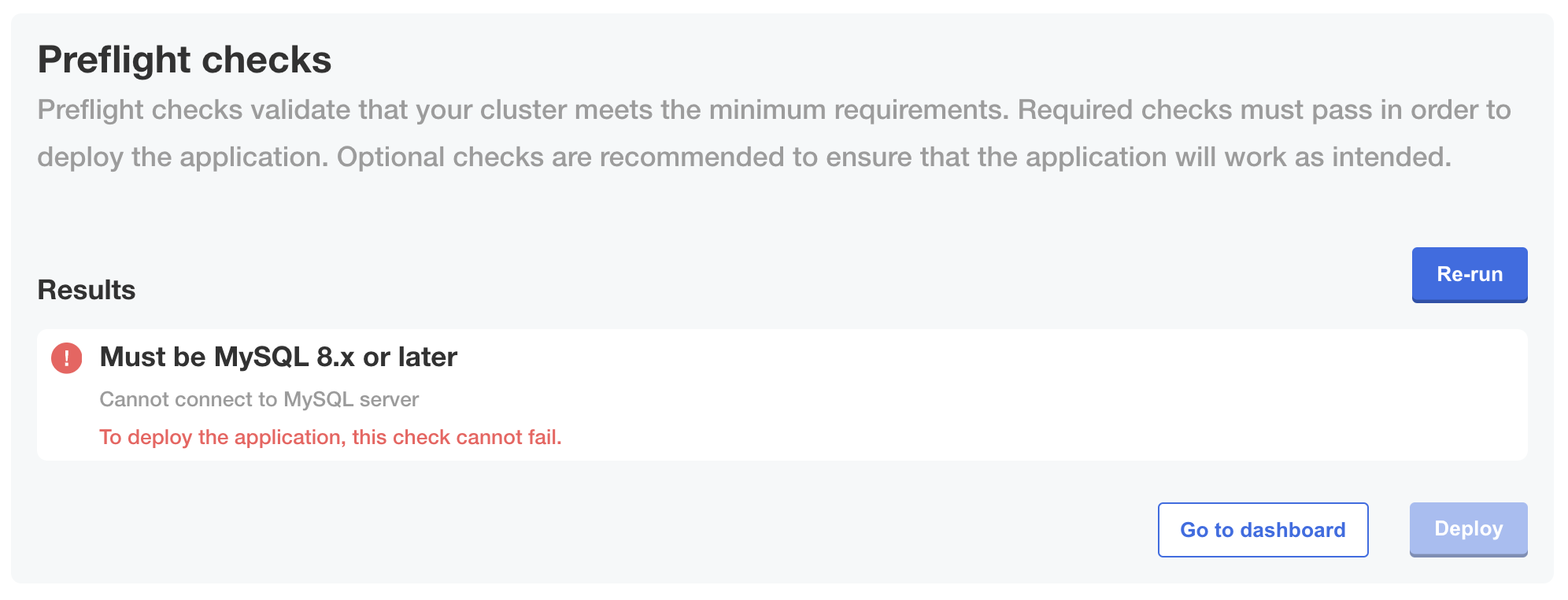
    <p>This example also uses an analyzer with <code>strict: true</code>, which prevents installation from continuing if the preflight check fails.</p>
    ```yaml
    apiVersion: troubleshoot.sh/v1beta2
    kind: Preflight
    metadata:
      name: my-app
    spec:
      collectors:
        - mysql:
            collectorName: mysql
            uri: 'repl{{ ConfigOption "db_user" }}:repl{{ConfigOption "db_password" }}@tcp(repl{{ ConfigOption "db_host" }}:repl{{ConfigOption "db_port" }})/repl{{ ConfigOption "db_name" }}'
      analyzers:
        - mysql:
            # `strict: true` prevents installation from continuing if the preflight check fails
            strict: true
            checkName: Must be MySQL 8.x or later
            collectorName: mysql
            outcomes:
              - fail:
                  when: connected == false
                  message: Cannot connect to MySQL server
              - fail:
                  when: version < 8.x
                  message: The MySQL server must be at least version 8
              - pass:
                  message: The MySQL server is ready
    ```
    <p>The following shows how a <code>fail</code> outcome for this preflight check is displayed in the Admin Console during KOTS installation or upgrade when <code>strict: true</code> is set for the analyzer:</p>
    <img alt="Strict preflight checks in Admin Console showing fail message" src="/images/preflight-mysql-fail-strict.png"/>
    <a href="/images/preflight-mysql-fail-strict.png">View a larger version of this image</a>
  </TabItem>
</Tabs>

## Check node memory

The examples below use the `nodeResources` analyzer to check that a required storage class is available in the nodes in the cluster. The `nodeResources` analyzer uses data from the default `clusterResources` collector. The `clusterResources` collector is automatically included.

For more information, see [Cluster Resources](https://troubleshoot.sh/docs/collect/cluster-resources/) and [Node Resources](https://troubleshoot.sh/docs/analyze/node-resources/) in the Troubleshoot documentation.

<Tabs>
  <TabItem value="secret" label="Kubernetes Secret" default>
    ```yaml
    apiVersion: v1
    kind: Secret
    metadata:
      labels:
        troubleshoot.sh/kind: preflight
      name: "{{ .Release.Name }}-preflight-config"
    stringData:
      preflight.yaml: |
        apiVersion: troubleshoot.sh/v1beta2
        kind: Preflight
        metadata:
          name: preflight-sample
        spec:
          analyzers: 
            - nodeResources:
                checkName: Every node in the cluster must have at least 8 GB of memory, with 32 GB recommended
                outcomes:
                  - fail:
                      when: "min(memoryCapacity) < 8Gi"
                      message: All nodes must have at least 8 GB of memory.
                      uri: https://kurl.sh/docs/install-with-kurl/system-requirements
                  - warn:
                      when: "min(memoryCapacity) < 32Gi"
                      message: All nodes are recommended to have at least 32 GB of memory.
                      uri: https://kurl.sh/docs/install-with-kurl/system-requirements
                  - pass:
                      message: All nodes have at least 32 GB of memory.
    ```
  </TabItem>
  <TabItem value="custom-resource" label="Preflight Custom Resource">
    ```yaml
    apiVersion: troubleshoot.sh/v1beta2
    kind: Preflight
    metadata:
      name: my-app
    spec:
      analyzers:
        - nodeResources:
            checkName: Every node in the cluster must have at least 8 GB of memory, with 32 GB recommended
            outcomes:
              - fail:
                  when: "min(memoryCapacity) < 8Gi"
                  message: All nodes must have at least 8 GB of memory.
                  uri: https://kurl.sh/docs/install-with-kurl/system-requirements
              - warn:
                  when: "min(memoryCapacity) < 32Gi"
                  message: All nodes are recommended to have at least 32 GB of memory.
                  uri: https://kurl.sh/docs/install-with-kurl/system-requirements
              - pass:
                  message: All nodes have at least 32 GB of memory.
    ```
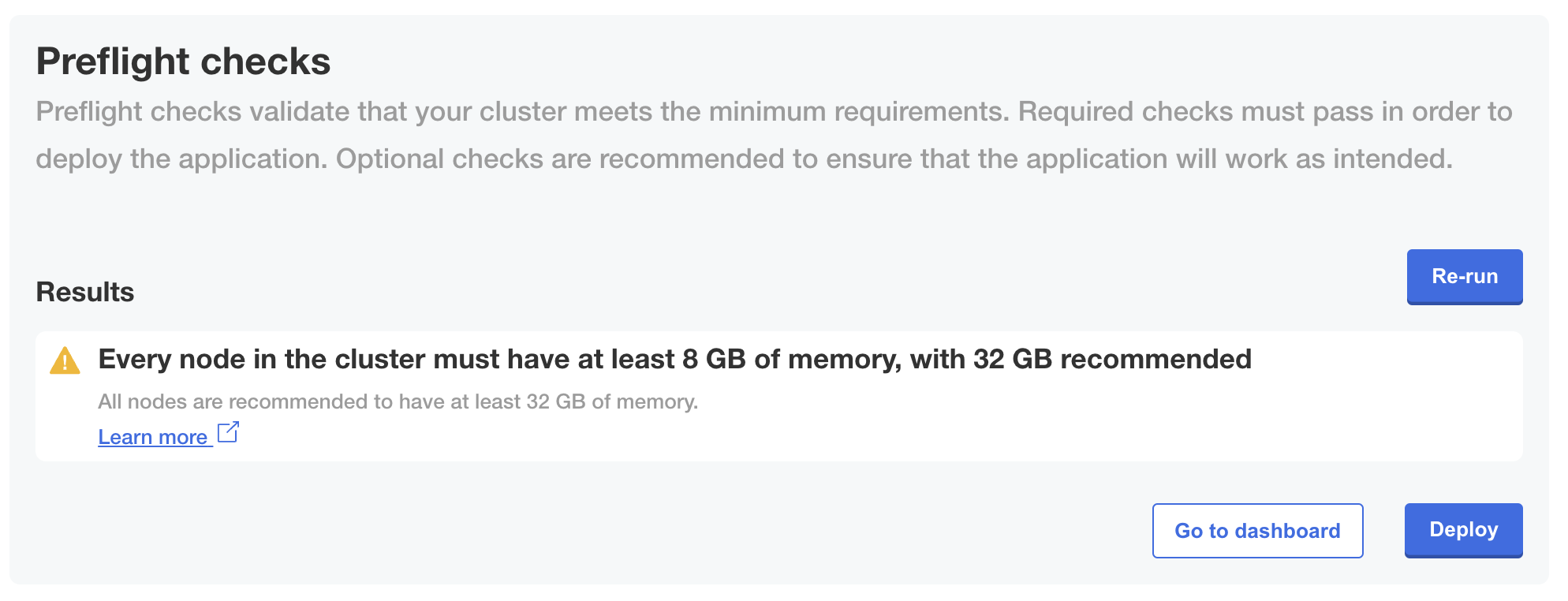
    <p>The following shows how a <code>warn</code> outcome for this preflight check is displayed in the Admin Console during KOTS installation or upgrade:</p>
    <img alt="Preflight checks in Admin Console showing warn message" src="/images/preflight-node-memory-warn.png"/>
    <a href="/images/preflight-node-memory-warn.png">View a larger version of this image</a>
  </TabItem>
</Tabs>

## Check node storage class availability

The examples below use the `storageClass` analyzer to check that a required storage class is available in the nodes in the cluster. The `storageClass` analyzer uses data from the default `clusterResources` collector. The `clusterResources` collector is automatically included.

For more information, see [Cluster Resources](https://troubleshoot.sh/docs/collect/cluster-resources/) and [Node Resources](https://troubleshoot.sh/docs/analyze/node-resources/) in the Troubleshoot documentation.

<Tabs>
  <TabItem value="secret" label="Kubernetes Secret" default>
    ```yaml
    apiVersion: v1
    kind: Secret
    metadata:
      labels:
        troubleshoot.sh/kind: preflight
      name: "{{ .Release.Name }}-preflight-config"
    stringData:
      preflight.yaml: |
        apiVersion: troubleshoot.sh/v1beta2
        kind: Preflight
        metadata:
          name: preflight-sample
        spec:
          analyzers:
            - storageClass:
                checkName: Required storage classes
                storageClassName: "default"
                outcomes:
                  - fail:
                      message: Could not find a storage class called "default".
                  - pass:
                      message: A storage class called "default" is present.    
    ```
  </TabItem>
  <TabItem value="custom-resource" label="Preflight Custom Resource">
    ```yaml
    apiVersion: troubleshoot.sh/v1beta2
    kind: Preflight
    metadata:
      name: my-app
    spec:
      analyzers:
        - storageClass:
            checkName: Required storage classes
            storageClassName: "default"
            outcomes:
              - fail:
                  message: Could not find a storage class called "default".
              - pass:
                  message: A storage class called "default" is present.
    ```
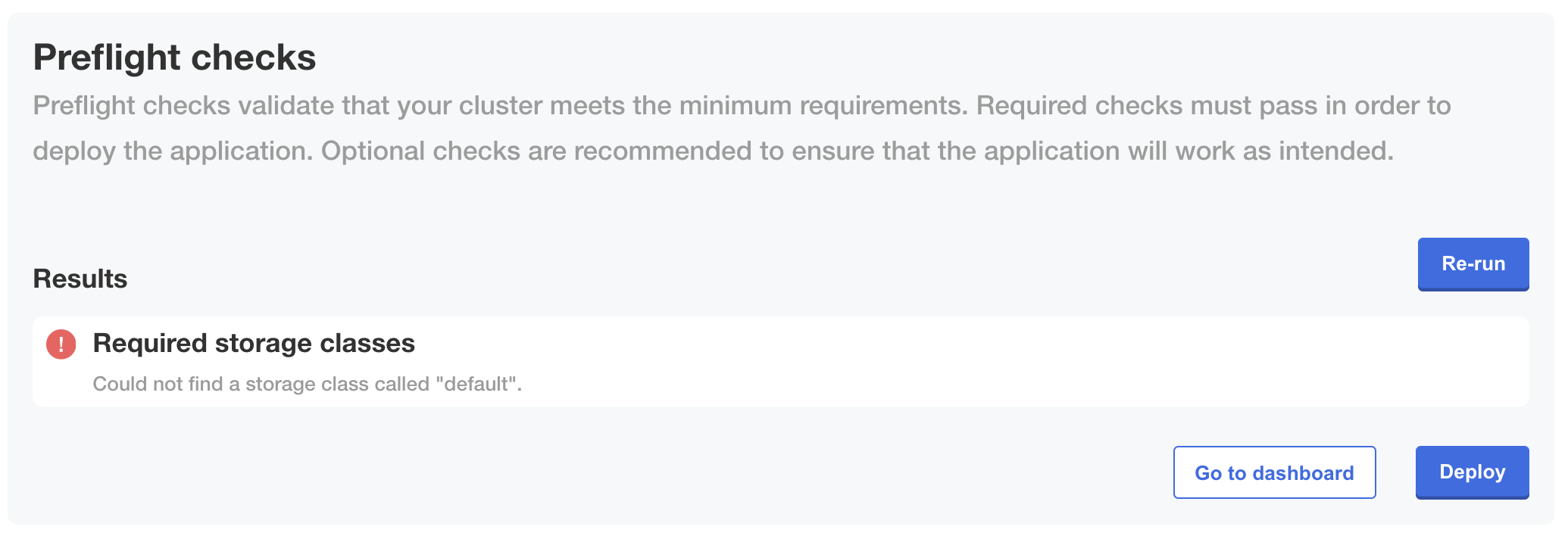
    <p>The following shows how a <code>fail</code> outcome for this preflight check is displayed in the Admin Console during KOTS installation or upgrade:</p>
    <img alt="Preflight checks in Admin Console showing fail message" src="/images/preflight-storageclass-fail.png"/>
    <a href="/images/preflight-storageclass-fail.png">View a larger version of this image</a>
  </TabItem>
</Tabs>

## Check node ephemeral storage

The examples below use the `nodeResources` analyzer to check the ephemeral storage available in the nodes in the cluster. The `nodeResources` analyzer uses data from the default `clusterResources` collector. The `clusterResources` collector is automatically included.

For more information, see [Cluster Resources](https://troubleshoot.sh/docs/collect/cluster-resources/) and [Node Resources](https://troubleshoot.sh/docs/analyze/node-resources/) in the Troubleshoot documentation.

<Tabs>
  <TabItem value="secret" label="Kubernetes Secret" default>
    ```yaml
    apiVersion: v1
    kind: Secret
    metadata:
      labels:
        troubleshoot.sh/kind: preflight
      name: "{{ .Release.Name }}-preflight-config"
    stringData:
      preflight.yaml: |
        apiVersion: troubleshoot.sh/v1beta2
        kind: Preflight
        metadata:
          name: preflight-sample
        spec:
          analyzers:
            - nodeResources:
                checkName: Every node in the cluster must have at least 40 GB of ephemeral storage, with 100 GB recommended
                outcomes:
                  - fail:
                      when: "min(ephemeralStorageCapacity) < 40Gi"
                      message: All nodes must have at least 40 GB of ephemeral storage.
                      uri: https://kurl.sh/docs/install-with-kurl/system-requirements
                  - warn:
                      when: "min(ephemeralStorageCapacity) < 100Gi"
                      message: All nodes are recommended to have at least 100 GB of ephemeral storage.
                      uri: https://kurl.sh/docs/install-with-kurl/system-requirements
                  - pass:
                      message: All nodes have at least 100 GB of ephemeral storage.
    ```
  </TabItem>
  <TabItem value="custom-resource" label="Preflight Custom Resource">
    ```yaml
    apiVersion: troubleshoot.sh/v1beta2
    kind: Preflight
    metadata:
      name: my-app
    spec:
      analyzers:
        - nodeResources:
            checkName: Every node in the cluster must have at least 40 GB of ephemeral storage, with 100 GB recommended
            outcomes:
              - fail:
                  when: "min(ephemeralStorageCapacity) < 40Gi"
                  message: All nodes must have at least 40 GB of ephemeral storage.
                  uri: https://kurl.sh/docs/install-with-kurl/system-requirements
              - warn:
                  when: "min(ephemeralStorageCapacity) < 100Gi"
                  message: All nodes are recommended to have at least 100 GB of ephemeral storage.
                  uri: https://kurl.sh/docs/install-with-kurl/system-requirements
              - pass:
                  message: All nodes have at least 100 GB of ephemeral storage.
    ```
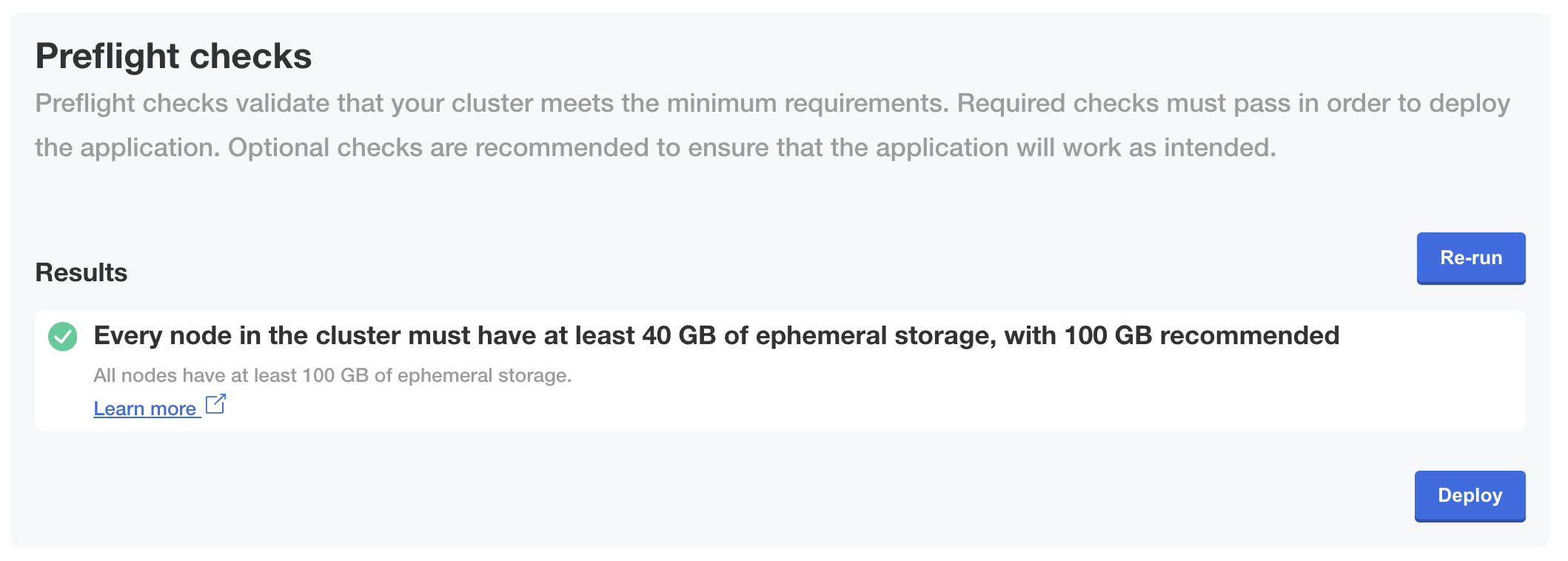
    <p>The following shows how a <code>pass</code> outcome for this preflight check is displayed in the Admin Console during KOTS installation or upgrade:</p>
    <img alt="Preflight checks in Admin Console showing pass message" src="/images/preflight-ephemeral-storage-pass.png"/>
    <a href="/images/preflight-ephemeral-storage-pass.png">View a larger version of this image</a>
  </TabItem>
</Tabs>

## Check requirements are met by at least one node

The examples below use the `nodeResources` analyzer with filters to check that the requirements for memory, CPU cores, and architecture are met by at least one node in the cluster. The `nodeResources` analyzer uses data from the default `clusterResources` collector. The `clusterResources` collector is automatically included.

For more information, see [Cluster Resources](https://troubleshoot.sh/docs/collect/cluster-resources/) and [Node Resources](https://troubleshoot.sh/docs/analyze/node-resources/) in the Troubleshoot documentation.

<Tabs>
  <TabItem value="secret" label="Kubernetes Secret" default>
    ```yaml
    apiVersion: v1
    kind: Secret
    metadata:
      labels:
        troubleshoot.sh/kind: preflight
      name: "{{ .Release.Name }}-preflight-config"
    stringData:
      preflight.yaml: |
        apiVersion: troubleshoot.sh/v1beta2
        kind: Preflight
        metadata:
          name: preflight-sample
        spec:
          analyzers:  
            - nodeResources:
                checkName: Node requirements
                filters:
                # Must have 1 node with 16 GB (available) memory and 5 cores (on a single node) with amd64 architecture
                  allocatableMemory: 16Gi
                  cpuArchitecture: amd64
                  cpuCapacity: "5"
                outcomes:
                  - fail:
                      when: "count() < 1"
                      message: This application requires at least 1 node with 16GB available memory and 5 cpu cores with amd64 architecture
                  - pass:
                      message: This cluster has a node with enough memory and cpu cores
    ```
  </TabItem>
  <TabItem value="custom-resource" label="Preflight Custom Resource">
    ```yaml
    apiVersion: troubleshoot.sh/v1beta2
    kind: Preflight
    metadata:
      name: my-app
    spec:
      analyzers:  
        - nodeResources:
            checkName: Node requirements
            filters:
            # Must have 1 node with 16 GB (available) memory and 5 cores (on a single node) with amd64 architecture
              allocatableMemory: 16Gi
              cpuArchitecture: amd64
              cpuCapacity: "5"
            outcomes:
              - fail:
                  when: "count() < 1"
                  message: This application requires at least 1 node with 16GB available memory and 5 cpu cores with amd64 architecture
              - pass:
                  message: This cluster has a node with enough memory and cpu cores
    ```
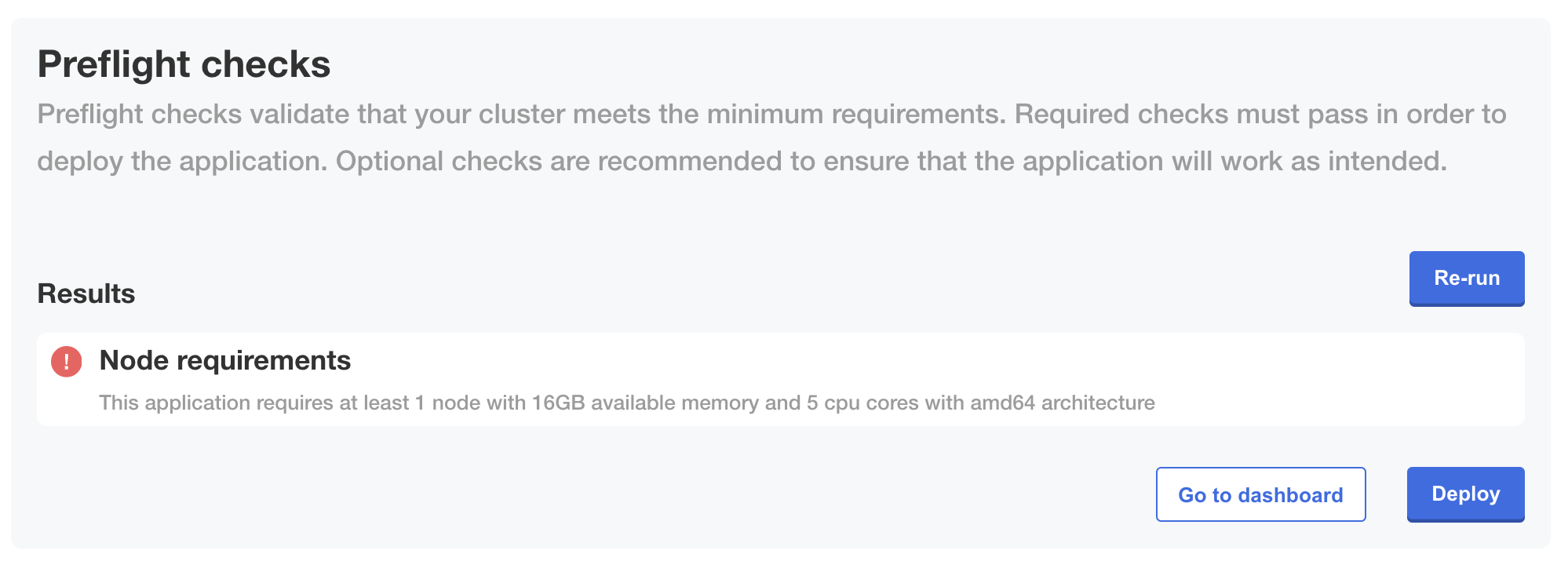
    <p>The following shows how the <code>fail</code> outcome for this preflight check is displayed in the Admin Console during KOTS installation or upgrade:</p>
    <img alt="Preflight checks in Admin Console showing fail message" src="/images/preflight-node-filters-faill.png"/>
    <a href="/images/preflight-node-filters-faill.png">View a larger version of this image</a>
  </TabItem>
</Tabs>

## Check total cpu cores across nodes

The examples below use the `nodeResources` analyzer to check the version of Kubernetes running in the cluster. The `nodeResources` analyzer uses data from the default `clusterResources` collector. The `clusterResources` collector is automatically included.

For more information, see [Cluster Resources](https://troubleshoot.sh/docs/collect/cluster-resources/) and [Node Resources](https://troubleshoot.sh/docs/analyze/node-resources/) in the Troubleshoot documentation.

<Tabs>
  <TabItem value="secret" label="Kubernetes Secret" default>
    ```yaml
    apiVersion: v1
    kind: Secret
    metadata:
      labels:
        troubleshoot.sh/kind: preflight
      name: "{{ .Release.Name }}-preflight-config"
    stringData:
      preflight.yaml: |
        apiVersion: troubleshoot.sh/v1beta2
        kind: Preflight
        metadata:
          name: preflight-sample
        spec:
          analyzers:
            - nodeResources:
                checkName: Total CPU Cores in the cluster is 4 or greater
                outcomes:
                  - fail:
                      when: "sum(cpuCapacity) < 4"
                      message: The cluster must contain at least 4 cores
                      uri: https://kurl.sh/docs/install-with-kurl/system-requirements
                  - pass:
                      message: There are at least 4 cores in the cluster 
    ```
  </TabItem>
  <TabItem value="custom-resource" label="Preflight Custom Resource">
    ```yaml
    apiVersion: troubleshoot.sh/v1beta2
    kind: Preflight
    metadata:
      name: my-app
    spec:
      analyzers:
        - nodeResources:
            checkName: Total CPU Cores in the cluster is 4 or greater
            outcomes:
              - fail:
                  when: "sum(cpuCapacity) < 4"
                  message: The cluster must contain at least 4 cores
                  uri: https://kurl.sh/docs/install-with-kurl/system-requirements
              - pass:
                  message: There are at least 4 cores in the cluster
    ```
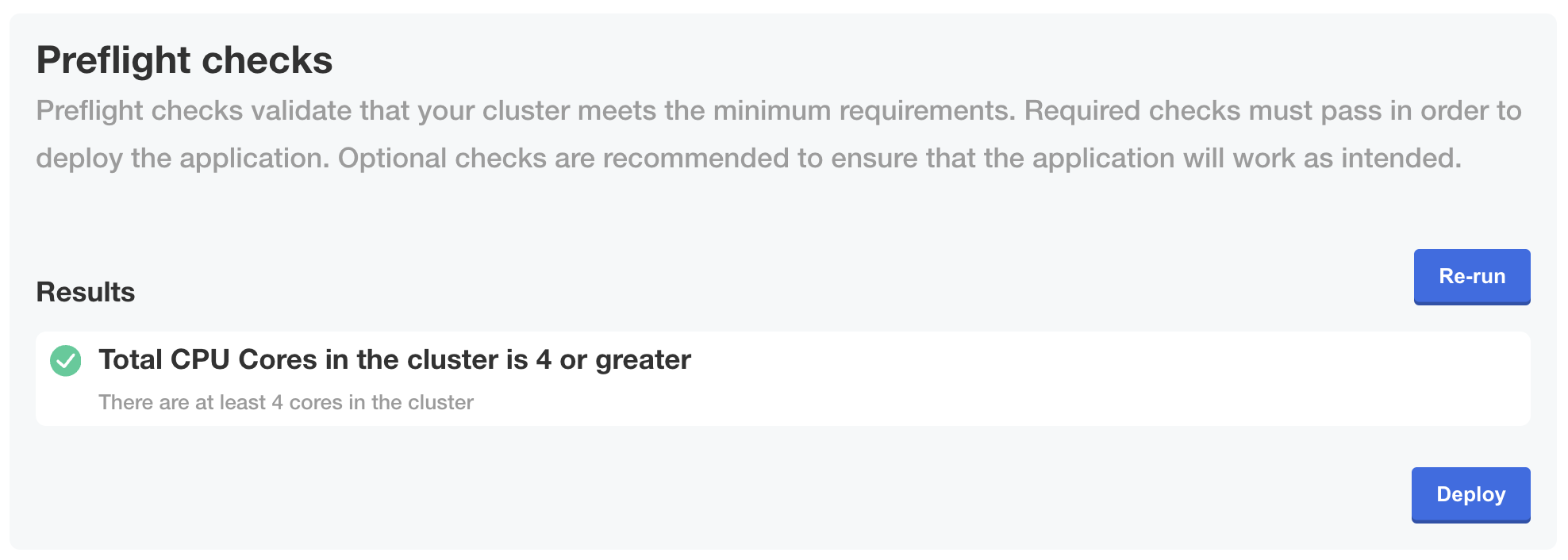
    <p>The following shows how the <code>pass</code> outcome for this preflight check is displayed in the Admin Console during KOTS installation or upgrade:</p>
    <img alt="Preflight checks in Admin Console showing fail message" src="/images/preflight-cpu-pass.png"/>
    <a href="/images/preflight-cpu-pass.png">View a larger version of this image</a>
  </TabItem>
</Tabs>