# Add links to the dashboard
This topic describes how to use the Kubernetes SIG Application custom resource to add links to the Replicated KOTS Admin Console dashboard.
## Overview
Replicated recommends that every application include a Kubernetes SIG Application custom resource. The Kubernetes SIG Application custom resource provides a standard API for creating, viewing, and managing applications. For more information, see [Kubernetes Applications](https://github.com/kubernetes-sigs/application#kubernetes-applications) in the kubernetes-sigs GitHub repository.
You can include the Kubernetes SIG Application custom resource in your releases to add links to the Admin Console dashboard. Common use cases include adding links to documentation, dashboards, or a landing page for the application.
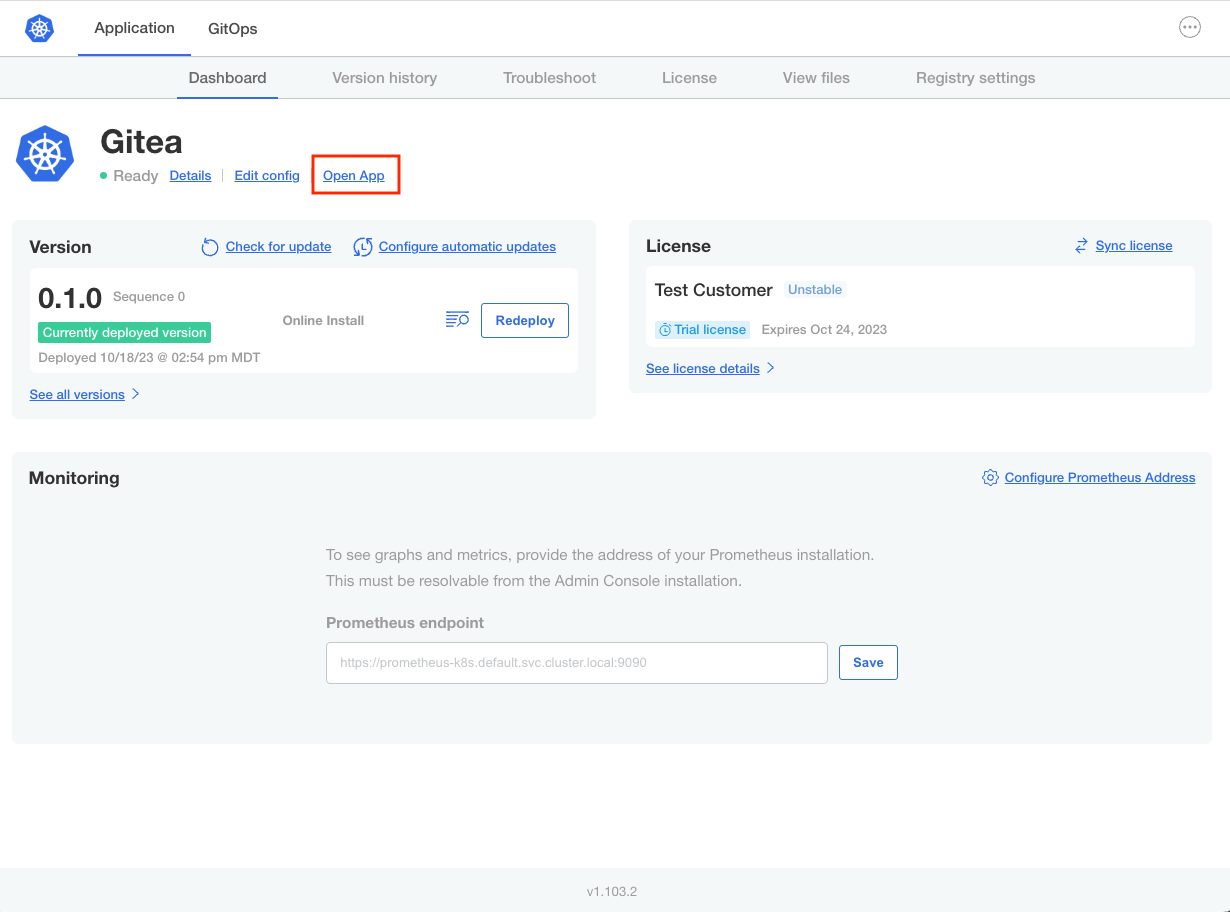
For example, the following shows an **Open App** button on the dashboard of the Admin Console for an application named Gitea:
 [View a larger version of this image](/images/gitea-open-app.png)
:::note
KOTS uses the Kubernetes SIG Application custom resource as metadata and does not require or use an in-cluster controller to handle this custom resource. An application that follows best practices does not require cluster admin privileges or any cluster-wide components to be installed.
:::
## Add a link
To add a link to the Admin Console dashboard, include a [Kubernetes SIG Application](https://github.com/kubernetes-sigs/application#kubernetes-applications) custom resource in the release with a `spec.descriptor.links` field. The `spec.descriptor.links` field is an array of links that are displayed on the Admin Console dashboard after the application is deployed.
Each link in the `spec.descriptor.links` array contains two fields:
* `description`: The link text that will appear on the Admin Console dashboard.
* `url`: The target URL.
For example:
```yaml
# App.k8s.io/v1beta1 application custom resource
apiVersion: app.k8s.io/v1beta1
kind: Application
metadata:
name: "gitea"
spec:
descriptor:
links:
- description: About Wordpress
url: "https://wordpress.org/"
```
When the application is deployed, the "About Wordpress" link is displayed on the Admin Console dashboard as shown below:
[View a larger version of this image](/images/gitea-open-app.png)
:::note
KOTS uses the Kubernetes SIG Application custom resource as metadata and does not require or use an in-cluster controller to handle this custom resource. An application that follows best practices does not require cluster admin privileges or any cluster-wide components to be installed.
:::
## Add a link
To add a link to the Admin Console dashboard, include a [Kubernetes SIG Application](https://github.com/kubernetes-sigs/application#kubernetes-applications) custom resource in the release with a `spec.descriptor.links` field. The `spec.descriptor.links` field is an array of links that are displayed on the Admin Console dashboard after the application is deployed.
Each link in the `spec.descriptor.links` array contains two fields:
* `description`: The link text that will appear on the Admin Console dashboard.
* `url`: The target URL.
For example:
```yaml
# App.k8s.io/v1beta1 application custom resource
apiVersion: app.k8s.io/v1beta1
kind: Application
metadata:
name: "gitea"
spec:
descriptor:
links:
- description: About Wordpress
url: "https://wordpress.org/"
```
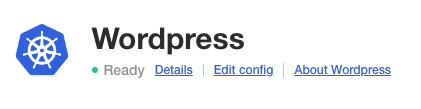
When the application is deployed, the "About Wordpress" link is displayed on the Admin Console dashboard as shown below:
 [View a larger version of this image](/images/dashboard-link-about-wordpress.png)
For an additional example of a Kubernetes SIG Application custom resource, see [application.yaml](https://github.com/kubernetes-sigs/application/blob/master/docs/examples/wordpress/application.yaml) in the kubernetes-sigs GitHub repository.
### Create URLs with user-supplied values using KOTS template functions {#url-template}
You can use Replicated template functions to template URLs in the Kubernetes SIG Application custom resource. This can be useful when all or some of the URL is a user-supplied value. For example, an application might allow users to provide their own ingress controller or load balancer. In this case, the URL can be templated to render the hostname that the user provides on the Admin Console Config screen.
The following examples show how to use the KOTS [ConfigOption](/reference/template-functions-config-context#configoption) template function in the Kubernetes SIG Application custom resource `spec.descriptor.links.url` field to render one or more user-supplied values:
* In the example below, the URL hostname is a user-supplied value for an ingress controller that the user configures during installation.
```yaml
apiVersion: app.k8s.io/v1beta1
kind: Application
metadata:
name: "my-app"
spec:
descriptor:
links:
- description: Open App
url: 'http://{{repl ConfigOption "ingress_host" }}'
```
* In the example below, both the URL hostname and a node port are user-supplied values. It might be necessary to include a user-provided node port if you are exposing NodePort services for installations on VMs or bare metal servers with [Replicated Embedded Cluster](/vendor/embedded-overview) or [Replicated kURL](/vendor/kurl-about).
```yaml
apiVersion: app.k8s.io/v1beta1
kind: Application
metadata:
name: "my-app"
spec:
descriptor:
links:
- description: Open App
url: 'http://{{repl ConfigOption "hostname" }}:{{repl ConfigOption "node_port"}}'
```
For more information about working with Replicated template functions, see [About Replicated Template Functions](/reference/template-functions-about).
[View a larger version of this image](/images/dashboard-link-about-wordpress.png)
For an additional example of a Kubernetes SIG Application custom resource, see [application.yaml](https://github.com/kubernetes-sigs/application/blob/master/docs/examples/wordpress/application.yaml) in the kubernetes-sigs GitHub repository.
### Create URLs with user-supplied values using KOTS template functions {#url-template}
You can use Replicated template functions to template URLs in the Kubernetes SIG Application custom resource. This can be useful when all or some of the URL is a user-supplied value. For example, an application might allow users to provide their own ingress controller or load balancer. In this case, the URL can be templated to render the hostname that the user provides on the Admin Console Config screen.
The following examples show how to use the KOTS [ConfigOption](/reference/template-functions-config-context#configoption) template function in the Kubernetes SIG Application custom resource `spec.descriptor.links.url` field to render one or more user-supplied values:
* In the example below, the URL hostname is a user-supplied value for an ingress controller that the user configures during installation.
```yaml
apiVersion: app.k8s.io/v1beta1
kind: Application
metadata:
name: "my-app"
spec:
descriptor:
links:
- description: Open App
url: 'http://{{repl ConfigOption "ingress_host" }}'
```
* In the example below, both the URL hostname and a node port are user-supplied values. It might be necessary to include a user-provided node port if you are exposing NodePort services for installations on VMs or bare metal servers with [Replicated Embedded Cluster](/vendor/embedded-overview) or [Replicated kURL](/vendor/kurl-about).
```yaml
apiVersion: app.k8s.io/v1beta1
kind: Application
metadata:
name: "my-app"
spec:
descriptor:
links:
- description: Open App
url: 'http://{{repl ConfigOption "hostname" }}:{{repl ConfigOption "node_port"}}'
```
For more information about working with Replicated template functions, see [About Replicated Template Functions](/reference/template-functions-about).